Barn Billing Owner Self-Service: Online Invoice Access
Horse barns lose an average of $2,800 per year to billing errors, disputed charges, and time spent answering "what's this charge for?" emails. Barn billing owner self-service portals eliminate most of that friction by giving owners direct access to their invoices, payment history, and dispute tools without a single phone call to you.
TL;DR
- Horse barns lose an average of $2,800 per year to billing errors and disputed charges, a self-service portal addresses the root cause directly.
- Before launching a portal, verify that your base board rates, per-horse fees, and billing cycle are configured correctly in your management system.
- BarnBeacon's dispute submission flow logs every exchange on the invoice record, replacing scattered texts and voicemails with a documented, time-stamped process.
- PDF downloads with per-horse itemization are essential for owners tracking expenses for HSA accounts or tax purposes.
- Sending portal invitations at least one week before the next billing cycle gives owners time to log in before they're looking at real charges.
- Offering both ACH bank transfer and credit card payment options from within the portal reduces friction and speeds up collections.
- Testing the full owner experience with a dummy account before going live catches display errors, broken PDF downloads, and form submission issues before owners see them.
This guide walks through exactly how to set up and use an owner-facing billing portal, from first login to resolved disputes.
Why Owners Need Direct Invoice Access
Most billing problems aren't about the money. They're about visibility. When an owner can't see a breakdown of their charges, they assume something is wrong.
A self-service portal solves this by putting the invoice in the owner's hands the moment it's generated. They can review line items, download PDFs, check payment history, and flag a concern before it becomes a confrontation at the barn.
What You Need Before You Start
Before you send owners a portal link, make sure three things are in place.
First, your billing setup needs to be accurate at the source. If your base board rates, add-on services, and per-horse fees aren't configured correctly in your management system, the portal will just surface errors faster. Review your billing and invoicing setup before going live.
Second, you need owner email addresses verified in your system. Portal invitations go to email, and a bounced invite means a delayed payment.
Third, decide on your billing cycle. Monthly is standard, but some barns run bi-weekly for lesson programs. Your portal should reflect whichever cycle you use, consistently.
Step-by-Step: Setting Up Owner Self-Service Access
Step 1: Enable the Owner Portal in Your Settings
In BarnBeacon, navigate to Settings > Owner Access > Portal. Toggle the portal on and choose which data owners can see: current invoices, past invoices, payment history, or all three.
Most barns enable all three. Transparency reduces disputes.
Step 2: Configure Invoice Visibility Rules
Decide whether owners see invoices immediately on generation or only after you've reviewed them. For straightforward monthly board, immediate release works fine. For complex multi-horse billing arrangements with variable charges, a 24-hour review window before release gives you time to catch errors.
BarnBeacon handles multi-horse billing automatically, calculating per-horse fees, shared pasture costs, and individual add-ons without manual entry. This is where tools built for simpler setups fall short: when one owner has three horses on different board packages plus a partial-month arrival, the math needs to be automatic, not manual.
Step 3: Send Portal Invitations
Go to Owners > Select Owner > Send Portal Invite. The system emails a secure link with a temporary password. Owners set their own password on first login.
Send invitations in a batch before your next billing cycle, not the day invoices go out. Give owners a week to get logged in and familiar with the interface before they're looking at real charges.
Step 4: Walk Owners Through Their Dashboard
A short email or handout goes a long way. Tell owners exactly what they'll find when they log in.
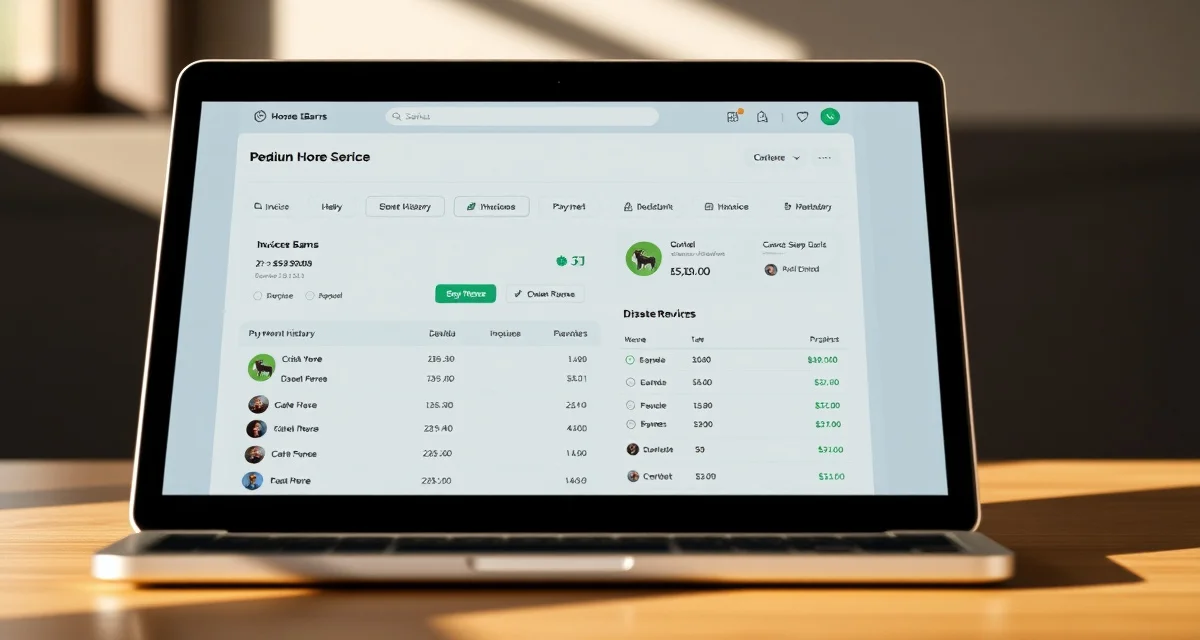
The dashboard shows the current balance due, the next payment due date, and a list of recent invoices. Each invoice is clickable. Inside, they'll see a line-by-line breakdown: base board, farrier visits, vet call fees, supplements, training sessions, and any other charges you've configured.
Step 5: Enable PDF Downloads
Owners who use HSA accounts or track expenses for tax purposes need downloadable PDFs. In BarnBeacon, PDF download is enabled by default. Each invoice generates a clean, dated PDF with your barn's name, the owner's name, horse names, and itemized charges.
If you're using a system that doesn't generate per-horse itemized PDFs, that's a gap worth addressing. Owners with multiple horses need to see which charges apply to which animal.
Step 6: Set Up the Dispute Submission Flow
This is the feature most barns overlook, and it's the one that saves the most time.
In BarnBeacon, go to Portal Settings > Dispute Handling. Enable the dispute form and set a response window (48 hours is standard). When an owner flags a charge, you receive a notification with the specific line item they're questioning and their comment.
You review it, adjust or confirm the charge, and the owner gets notified automatically. The entire exchange is logged on the invoice record.
Without a formal dispute flow, these conversations happen over text, email, and voicemail simultaneously. Nothing gets documented, and the same dispute resurfaces at the next billing cycle.
Step 7: Connect Payment Options
The portal is most effective when owners can pay directly from it. Link your payment processor in Settings > Payments. BarnBeacon supports ACH bank transfer and credit card. ACH is cheaper for you; credit card is more convenient for owners. Offer both.
Once connected, owners see a "Pay Now" button on any open invoice. Payment status updates in real time on both their dashboard and yours. For barns that also want to automate recurring board payments, BarnBeacon supports scheduled billing tied directly to the portal.
Common Mistakes to Avoid
Launching before your rate table is clean. If your system has outdated board rates or duplicate service entries, the portal will surface those errors to owners immediately. Audit your rates first.
Not testing the owner experience yourself. Create a test owner account and go through the full flow before sending real invitations. Check that invoices display correctly, PDFs download, and the dispute form submits.
Skipping the communication step. Owners who receive a portal link with no explanation often ignore it. Send a short email explaining what the portal is, what they can do with it, and why you're using it. Frame it as a convenience for them, not a change in how you operate.
Leaving dispute notifications unmonitored. If owners submit disputes and don't hear back within your stated window, trust erodes. Assign one person to monitor dispute notifications and respond within 48 hours, every time.
How This Connects to Your Broader Billing System
The owner portal is the front end of your billing operation. The back end, where you configure rates, generate invoices, and track payments, needs to be equally solid.
If you're evaluating whether your current setup can support a self-service portal, the barn management software overview covers what to look for in a system that handles both sides well. An equine boarding online billing portal is only as good as the data feeding it.
How do I bill accurately for complex boarding arrangements?
Accurate billing for complex arrangements, such as multiple horses per owner, partial-month arrivals, or mixed board packages, requires a system that calculates charges automatically based on per-horse configurations. Manual spreadsheets introduce errors at scale. BarnBeacon applies your rate rules automatically across every horse and every billing cycle, so the invoice is correct before you ever review it.
What is the best billing software for horse barns?
The best billing software for horse barns handles automated invoice generation, per-horse itemization, owner-facing portals, and payment processing in one system. Some tools handle basic invoicing but lack automation for variable charges. Others offer good record-keeping but no owner portal. BarnBeacon is built specifically for equine facilities and covers the full billing workflow, including the complex multi-horse scenarios that general tools can't handle cleanly.
How do I reduce billing disputes with horse owners?
Most disputes come from owners who can't see the detail behind a charge. Giving owners access to an itemized invoice through a self-service portal, before they have to ask, eliminates the majority of disputes. When disputes do occur, a formal submission and response flow keeps the conversation documented and resolved faster than back-and-forth messages across multiple channels.
Can owners make partial payments through the portal?
Whether to allow partial payments is a policy decision you configure in your settings, not a limitation of the portal itself. Some barns allow partial payments for owners on payment plans, while others require payment in full before the next billing cycle. BarnBeacon lets you set this at the barn level or on a per-owner basis, so your policy is enforced automatically without manual follow-up.
What happens if an owner never logs into the portal?
Portal adoption varies. Some owners log in immediately; others need a reminder. If an owner hasn't accessed the portal within two weeks of receiving their invitation, send a follow-up email with the login link and a one-paragraph explanation of what they'll find there. Owners who prefer paper statements can still receive emailed PDFs, but keeping them in the portal ensures their payment history and dispute records stay in one place for your records.
Is owner billing data secure in a cloud-based portal?
Yes, provided your software vendor uses standard security practices. Look for SSL encryption on all data in transit, role-based access controls so owners only see their own records, and secure password reset flows. BarnBeacon stores owner billing data with encrypted connections and does not expose one owner's invoices or payment history to any other portal user.
FAQ
What is Barn Billing Owner Self-Service: Online Invoice Access?
Barn Billing Owner Self-Service Online Invoice Access is a digital portal that gives horse owners direct visibility into their invoices, payment history, and charge details without contacting barn staff. Through BarnBeacon, owners can log in at any time to review per-horse itemization, download PDF statements, submit billing disputes, and make payments. It replaces the back-and-forth of texts and emails with a centralized, time-stamped record that benefits both barn managers and boarders.
How much does Barn Billing Owner Self-Service: Online Invoice Access cost?
BarnBeacon's owner self-service portal is included as part of the barn management platform rather than billed as a standalone add-on. Pricing depends on the subscription tier you choose, with costs typically structured per-barn rather than per-owner. Because the portal reduces staff time spent answering billing questions and chasing payments, most barns recover the platform cost quickly. Contact BarnBeacon directly for current pricing and to find the plan that fits your operation size.
How does Barn Billing Owner Self-Service: Online Invoice Access work?
Once configured, BarnBeacon generates invoices automatically based on your board rates, per-horse fees, and billing cycle. Owners receive an email invitation to their portal, where they can view itemized charges, download PDFs, and pay via ACH or credit card. If a charge looks wrong, owners submit a dispute directly on the invoice record. Every exchange is logged with a timestamp, keeping the entire billing conversation in one place instead of scattered across voicemails and texts.
What are the benefits of Barn Billing Owner Self-Service: Online Invoice Access?
The core benefit is time savings: barns lose an average of $2,800 per year to billing errors, disputed charges, and administrative back-and-forth. A self-service portal eliminates most of those costs by letting owners resolve questions independently. Additional benefits include faster payment collection through in-portal ACH and card options, cleaner dispute documentation, and PDF downloads that owners can use for HSA reimbursements or tax records. Staff spend less time on billing inquiries and more time managing horses.
Who needs Barn Billing Owner Self-Service: Online Invoice Access?
Any barn offering horse boarding can benefit, but the portal is especially valuable for operations with ten or more horses where billing volume makes manual follow-up unscalable. Owners who track expenses for tax deductions, HSA accounts, or shared-ownership arrangements particularly appreciate itemized PDF access. Barn managers who regularly field 'what is this charge?' messages will see the most immediate relief. If your billing process involves recurring disputes or late payments, a self-service portal directly addresses the root cause.
How long does Barn Billing Owner Self-Service: Online Invoice Access take?
Setup time depends on how cleanly your existing board rates and per-horse fees are configured. If your BarnBeacon management system is already accurate, enabling the portal and sending owner invitations can be done in a single session. Plan to send invitations at least one week before the next billing cycle so owners have time to log in before live charges appear. Testing the full owner experience with a dummy account first catches display errors before real boarders encounter them.
What should I look for when choosing Barn Billing Owner Self-Service: Online Invoice Access?
Look for a portal that offers itemized per-horse breakdowns rather than lump-sum totals, since owners need line-level detail to verify charges. Dispute submission should log every exchange directly on the invoice record, not in a separate email thread. Payment options should include both ACH bank transfer and credit card to reduce friction. PDF downloads are essential for owners with tax or HSA needs. Finally, confirm the system lets you test the owner view before inviting real boarders to go live.
Is Barn Billing Owner Self-Service: Online Invoice Access worth it?
For most boarding barns, yes. The average $2,800 annual loss from billing friction is a conservative estimate that doesn't count the opportunity cost of staff time spent answering invoice questions. A portal that gives owners 24/7 access to their records, a clear dispute process, and in-portal payment options typically pays for itself within the first billing cycle or two. If your barn regularly deals with late payments, charge disputes, or repetitive billing emails, the ROI is straightforward.
Sources
- American Horse Council, Industry Statistics and Economic Impact Reports
- United States Equestrian Federation, Facility and Business Management Resources
- University of Minnesota Extension, Horse Business Management Program
- Equine Business Association, Best Practices for Equine Facility Operations
- SCORE Association, Small Business Financial Management Guides
Get Started with BarnBeacon
If billing disputes, unanswered invoice questions, and manual payment tracking are taking time away from running your barn, BarnBeacon's owner self-service portal gives you a direct way to fix that. Owners get full visibility into their invoices, payment history, and dispute options; you get fewer interruptions and a documented record of every billing exchange. Start a free trial and have your first owner portal invitations sent before your next billing cycle.